 NearWord
How to look up words in PDFs
Read papers, textbooks, and scanned pages with a dictionary at hand.
One word, not the whole document
Often you only need help with a single word. Keep the document in your usual reader, point to the word, and press your NearWord shortcut.
The dictionary gives you its meanings. AI Context helps with expressions that make little sense when translated word by word.
The word depends on the page
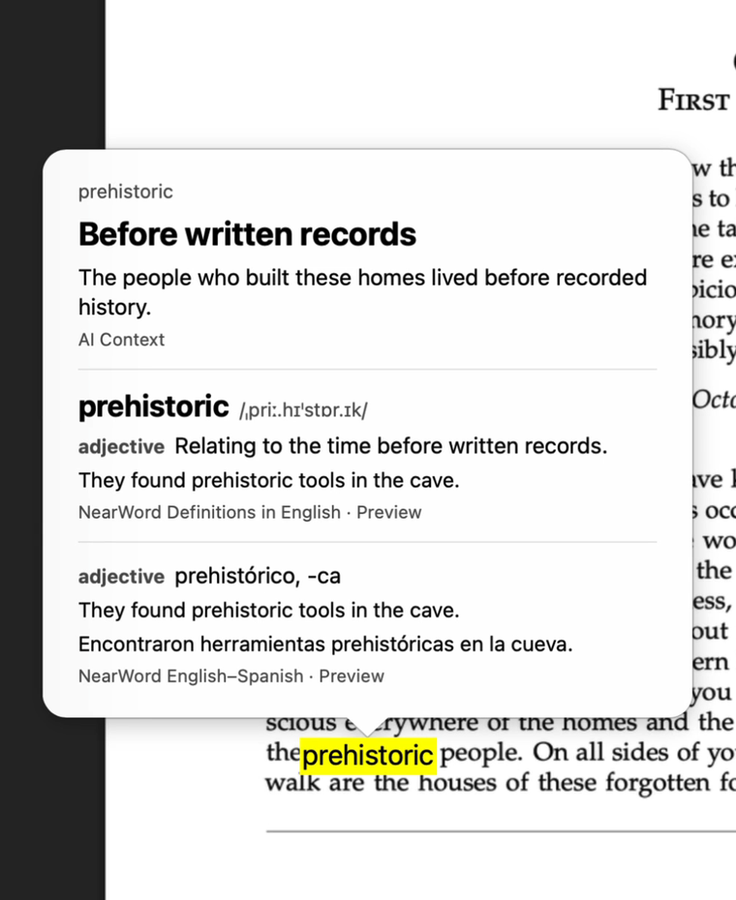
In the novel, prehistoric refers to a time before written records. In the paper, redundancy means putting a record into several blocks so matching records are more likely to be found.
On Wikipedia, tricks are sets of cards won during play, not deceptions. A familiar word can need a different explanation when the subject changes.
Check the text before the meaning
If you can select the word, try your reader’s built-in lookup first. For a scan, enlarge the paragraph until the letters are clear, point to the word, and open NearWord. Compare the recognized word with the page before trusting the definition: a wrong letter can lead to a perfectly good answer for the wrong word.
Columns, footnotes, and broken lines can also muddle the surrounding text. If an explanation seems unrelated, reread the sentence on the page. A dictionary entry helps with vocabulary. It doesn’t settle what an author means by a technical term.
Try NearWord
Available on macOS. Downloaded dictionaries work offline without an account. AI Context is optional and needs an account and internet access.
Download NearWord